By Brian McNeilly, Web Accessibility Specialist
With the updates to the policy around digital accessibility, there is a renewed interest in digital accessibility throughout the university. While, understandably, the majority of attention is focused on documents and services the university provides directly, the policy also covers the digital accessibility of vendor content as well – both documents created by them and platforms they publish.
How then do we assess the accessibility of a vendor, particularly if for something like a website that has not yet been built? In this article we’ll discuss not just what to look for when choosing a vendor, but how to determine a rough level of their digital accessibility maturity.
As a quick refresher, the refreshed UC Policy around accessibility – IMT-1300 – requires that content used by UC meet the Web Content Accessibility Standards (WCAG) version 2.1. Within WCAG 2.1, there are individual testable statements called success criteria, an example of one is 1.1.1 Non-Text Content which requires images have alt text. Each success criterion has a conformance level assigned to it – either A, AA, or AAA. To claim conformance to WCAG at a given level, a product must meet all of the success criteria at that level & any level underneath it. For instance, to meet WCAG 2.1 AA, a product must meet all the AA criteria, along with all of the A criteria. UC Policy, along with most rulemaking around accessibility globally, requires meeting the AA level of conformance.
Testing a product
The gold standard for determining the accessibility of a vendor is testing their product directly. Manually confirming that some of the most common accessibility issues are not present in a document will ensure that the content being delivered is accessible.
A manual review of a product should cover all of the unique pieces of a product. In a document, this would be the whole document, but in something like a website, there may be repeated pieces of content that are used on multiple pages, so those would not need to be tested each time. For a deeper dive on deciding what needs to be evaluated, the W3C (the authors of the WCAG standards) provide a helpful WCAG Evaluation Methodology that discusses all of this in more detail.
Conducting a full evaluation would require not just automated tools but dedicated assistive technologies and a clear understanding of the WCAG requirements. Even if you do not feel comfortable conducting a full WCAG audit on your own, you may be able to use an automated tool to quickly assess the product’s accessibility.
Trusted accessibility checker tools include (in alphabetical order):
- Accessibility Checker by SiteImprove
- ArcToolkit by TPGi
- Axe Devtools by Deque
- Google Lighthouse
- WAVE by WebAIM
Each of these have slight differences, pros and cons, but they will all give you a set of results telling you if they found some accessibility errors in a product.
It’s important to remember that while automated accessibility checkers can be run quickly, they will not catch the majority of digital accessibility issues. But, as we noted earlier in order to meet the accessibility policy, vendors must fully comply with all of the WCAG requirements. So, while automated scans may not detect everything, if we do find issues, these, along with any others manual testing finds, will need to be resolved.
Testing other sample content
Sometimes we don’t have access to a vendor’s product when we’re procuring their services. A classic example is getting a contract for a website. If the vendor is building the website, we won’t be able to test it until it’s completed. While we could wait until the final product is completed, one of the top best practices around accessibility is to shift accessibility work earlier in a project lifecycle to reduce delays at the end.
To that end, even without a final product to review, it can be helpful to take a look at other similar products from a vendor, to see how their previous work has been around accessibility. In the case of a web development firm, taking a look at previous websites they have built can tell you a lot about their accessibility skills.
Even when getting ahold of sample work may be challenging, we can always investigate the vendor’s website directly. While this is not an apples-to-apples comparison to their actual work products, a marketing website can tell you a lot about a vendor’s priorities. After all, it is literally an extension of their brand – if they are thinking about accessibility, hopefully they will showcase that by having an accessible website.
Evaluating vendor policies
Looking at a vendor’s website also can provide us with another piece of our accessibility investigation – a publicly described policy. While the previous section was thinking about accessibility of the website itself, here we will be investigating what the vendor publicly states about their product or services.
Often located in the footer of their marketing website, look for a link that says “Accessibility” or “Accessibility Policy”. If there isn’t one there, use any available search on the vendor’s website to find out more. If you can’t find any documentation at all about digital accessibility, this is certainly a clue about the vendor’s priorities. If you can though, here are a few things to look for in a policy.
The first thing we want to look for how specific a claim a vendor has given in their written policy. Often, vendors will have a policy that says they will “meet accessibility requirements”, or some other vague language. A clearer indication of what is meant – for instance, by citing an existing standard will not only provide us more information but give confidence the vendor themselves knows what they mean. If a vendor cites WCAG 2.0, rather than 2.1 in their standard, that may mean that there is a gap between what our policy requires and what they have committed to. Additionally, it may imply that they are not keeping their policy up to date. Alternatively, if they cite the latest version of WCAG, 2.2 at time or writing, or conformance to the AAA level, we might infer that they are publicly committing to more than just the minimum standard required in our policy.
Beyond just conformance, any additional details in a policy can indicate the level of accessibility maturity that a vendor has. Do they mention routine audits of their products by 3rd party vendors? Do they commit to any sort of timeline remediating accessibility issues? In general, more specificity that can be verified will indicate someone who has thought through digital accessibility more. In addition to a written policy, many vendors may supply a document that tries to outline their conformance to WCAG, which we’ll talk about next.
Reading an ACR/VPAT
When you hear a vendor talk about digital accessibility, one of the first things they may mention to you is that they have an Accessibility Conformance Report (ACR) or VPAT (originally an acronym for ‘Voluntary Product Accessibility Template). These documents are built on a template developed by the Information Technology Industry Council (ITI) in an effort to standardize how reporting on accessibility was done. Effectively, these documents are a set of front matter, followed by a table containing each of the WCAG Success Criteria, along with cells to indicate if a vendor conforms, and an optional section to provide comments. Reading one of these can be daunting – especially at first – but there are a few quick tricks to determining how to think about one of these documents.
Similar to policies, the level of description within a VPAT will vary considerably from one to another. Most VPATs are self-authored by a vendor, which means that the person authoring the documents has a lot of incentive to make their product seem as conformant as it can be. This makes the job of a reviewer more like that of an investigator, trying to determine fact from fiction.
Front Matter
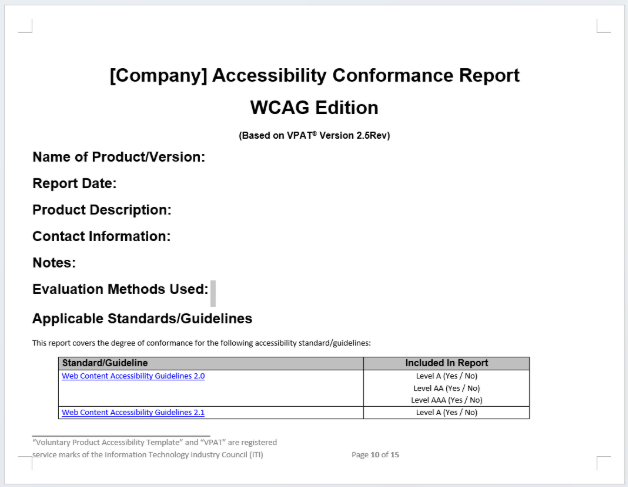
To that end, the first thing to investigate is who authored the document, when they did it, and how they went about getting their scores. The front matter of the VPAT should contain all of this information. By default, there are sections for the “Report Date,” “Product Description,” “Contact Information,” “Notes,” and “Evaluation Methods Used.” Many vendors skip these fields entirely, which should be an immediate red flag.
Within these fields, we would hope to have a clear indication of who did the testing and how to get ahold of them. If you have the time, and an individual is listed, see if you can find their title. If they are an accessibility expert, you might give more weight to their answers compared to someone in the sales department.
Next, look at how recently the document was authored, and what was actually tested. A more recent document implies not only that the product was tested recently but may indicate these updates happen on a regular basis. Within the product description, vendors typically list what parts of the product were tested. Occasionally, vendors will only test part of their product, and list sections that they intentionally excluded. If those excluded sections are important to your use of the product, that should definitely be noted, and follow-up should be done with the vendor.
The most essential piece to investigate in the VPAT front-matter is the evaluation methods used. Similar to the specificity in policies, more detail here – including types of assistive technologies, browsers, or testing that has been done – will indicate a level of digital accessibility maturity.
Data
Within the data portion of the document, the biggest thing to look out for is something that just says “Supports” across the board for every requirement without any comments. Rather than indicating a product that is actually conformant, it tends to indicate someone who is quickly rushing through the process of creating this document and wants to believe their product complies.
Conformance to a Success Criterion within a VPAT typically is set as either “Supports,” “Partially Supports,” “Does Not Support.” The distinction between “Partially Supports” and “Does Not Support” can be tricky and typically rests on whether the majority of the content supports a given Success Criterion or not. In addition to these most common conformance levels, users can list “Not Applicable” for content that does not apply. However, per the WCAG rules, they can also choose to list these Success Criteria as “Supports.” Finally, there is the score of “Not Evaluated.” These are typically used for AAA Success Criteria, or for other requirements that aren’t relevant – but we should not be seeing these scores for any A or AA Success Criteria.
The comments field within a VPAT is where most of the value within the data section can be found. At a minimum, in an author should justify how and why they gave the score they did for a given Success Criterion. “Supports” without any context makes things unclear, but a comment can indicate that a vendor actually understood what the Success Criterion was asking and that they knew how to test the content before coming up with a score.
Wrapping up
Assessing a vendor’s compliance can be a challenge, but hopefully with this guidance you’re feeling confident to start. As a rule of thumb when evaluating text, always look for specifics – the more details and information provided, the better. While specifics are always great, this is no substitute for actual testing. The best policy in the world can be written down, but if it isn’t followed, we are still not in compliance.
As always, if you have additional questions or need some expert opinion, reach out to accessibility experts at your location.
Author

Brian McNeilly
Web Accessibility Specialist
UC Office of the President
About the Accessibility Matters at UC series
We heard you! When we reviewed our content survey results, one message came through clearly: there’s a growing need for more focus on accessibility. And you’re right—accessibility affects everyone! Follow along as we share stories that highlight why accessibility truly matters at UC. Do you have a story to contribute to the series? Submit an intake form!Submit a UC Tech News blog intake form found here.